Lok Seva Kendra · Tender
LSK Tender Pro By RSP
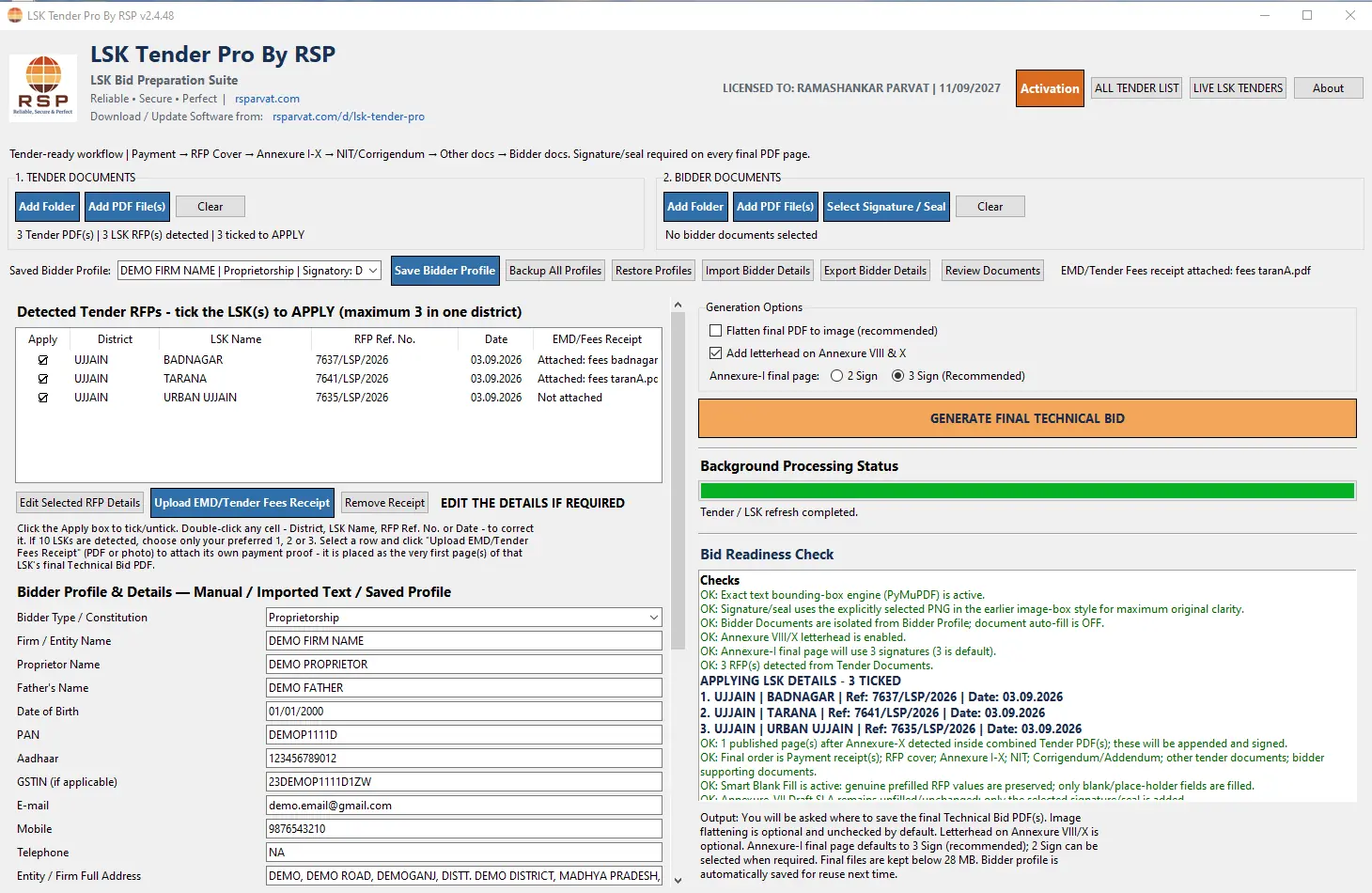
इस सॉफ्टवेयर से आप अपने लोक सेवा केंद्र के सभी Annexures 5 मिनट के अंदर भरकर PDF में आउटपुट ले सकते हैं, वो भी सील-साइन के साथ।With this software you can fill all the annexures for your Lok Seva Kendra within 5 minutes and get the output as a PDF, complete with seal and sign.
- टेंडर दस्तावेज़ जोड़ें, RFP अपने आप पहचाने जाते हैंAdd the tender documents and the RFPs are detected automatically
- बिडर की जानकारी एक बार भरें, सेव करें और दोबारा इस्तेमाल करेंEnter bidder details once, save them and reuse them
- हर फ़ाइनल PDF पेज पर सील और साइनSeal and sign on every final PDF page
- एक क्लिक में Final Technical Bid PDF, साइज़ 28 MB से कमFinal Technical Bid PDF in one click, kept below 28 MB
- Bid Readiness Check से कमी पहले ही पता चल जाती हैThe Bid Readiness Check shows gaps before you submit
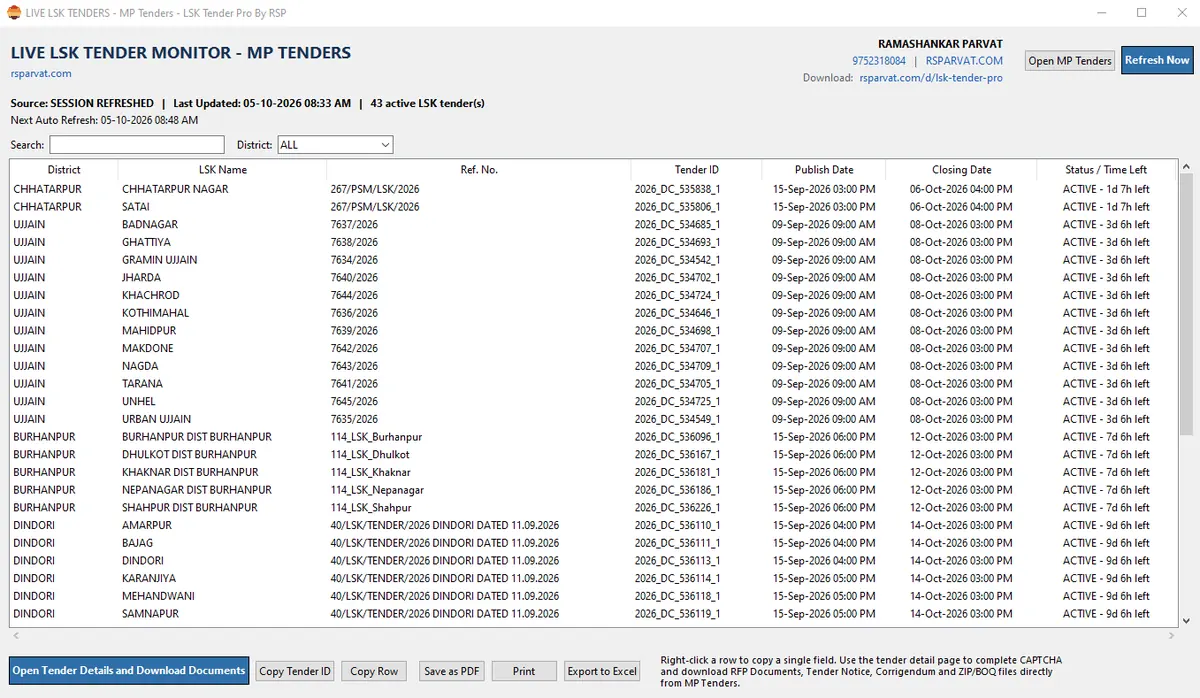
- Live LSK Tender Monitor साथ में शामिल: सभी चालू LSK टेंडर और उनकी पूरी जानकारी (जिला, LSK नाम, Ref. No., समय सीमा) एक स्क्रीन परLive LSK Tender Monitor included: every live LSK tender with its details (district, LSK name, ref. no., closing time) on one screen
शर्तें एक नज़र में: पहला 1 महीना मुफ़्त · उसके बाद की फीस की जानकारी सॉफ्टवेयर के अंदर ही दी गई है · एक Activation Key एक PC पर चलती है · मदद के लिए WhatsApp 9752318084।Terms at a glance: first 1 month free · the fee after that is shown inside the software · one Activation Key works on one PC · help on WhatsApp 9752318084.
शुरू कैसे करें: डाउनलोड करें → Activation स्क्रीन पर Request Code बनाकर WhatsApp 9752318084 पर भेजें → मिली Activation Key paste करें। (यह सिर्फ़ उसी PC पर चलेगी।)How to start: Download → generate the Request Code on the Activation screen and send it to WhatsApp 9752318084 → paste the Activation Key you get. (Works on that PC only.)
📘 संक्षिप्त गाइड — कैसे चलाएँ और एक्टिवेट करें📘 Quick guide — how to use and activate
बिड कैसे बनाएँMaking a bid
- Add Folder / Add PDF File(s) से जिले की RFP जोड़ें।Add the district RFP with Add Folder / Add PDF File(s).
- Saved Bidder Profile चुनें (या फ़र्म की जानकारी भरें) और Signature/Seal चुनें।Pick a saved Bidder Profile (or fill in firm details) and select your Signature/Seal.
- पहचाने गए LSK में से जिसके लिए apply करना है उसे tick करें (एक जिले में अधिकतम 3)।Tick the detected LSK(s) you want to apply for (max 3 per district).
- GENERATE FINAL TECHNICAL BID दबाएँ, PDF जाँचें और खुद पोर्टल पर अपलोड करें।Click GENERATE FINAL TECHNICAL BID, check the PDF and upload it to the portal yourself.
एक्टिवेशनActivation
- सॉफ्टवेयर इंस्टॉल करके खोलें — इस PC का Machine Code अपने-आप बनता है।Install and open the software — a Machine Code for this PC is created automatically.
- Activation स्क्रीन पर नाम और WhatsApp नंबर डालें, plan चुनें और Request Code बनाएँ।On the Activation screen enter your name and WhatsApp number, choose a plan and generate the Request Code.
- Request Code को बिना बदले WhatsApp 9752318084 पर भेजें।Send the Request Code unchanged to WhatsApp 9752318084.
- मिली Activation Key सॉफ्टवेयर में paste करके activate करें। यह सिर्फ़ उसी PC पर चलेगी।Paste the Activation Key you receive into the software. It works on that PC only.
Live LSK Tender MonitorLive LSK Tender Monitor
header में LIVE LSK TENDERS दबाएँ — चालू LSK टेंडर हर 15 मिनट में अपने-आप refresh होते हैं, सबसे जल्दी बंद होने वाले ऊपर। नारंगी = 24 घंटे में बंद, पीला = VERIFY (खुद जाँचें), ग्रे = अवधि समाप्त। Search/District filter, Copy, PDF/Excel export उपलब्ध है।Click LIVE LSK TENDERS in the header — live LSK tenders refresh every 15 minutes, nearest closing first. Orange = closes within 24 hours, Yellow = VERIFY (check yourself), Grey = expired. Search/District filter, Copy and PDF/Excel export are available.
अपलोड से पहलेBefore you upload
LSK नाम, जिला, Ref. No. और तारीख, Annexure-I का Signature mode, और signature/seal की जगह जाँच लें। पूरी गाइड (PDF) डाउनलोड वाले फ़ोल्डर में मिलती है।Check the LSK name, district, ref. no. and date, the Annexure-I signature mode, and the signature/seal placement. The full guide (PDF) is in the download folder.