DSC खरीदें, रिन्यू करें और डाउनलोड करेंBuy, renew and download your DSC
2014 से DSC क्षेत्र में। Capricorn, PantaSign और eMudhra के बिज़नेस पार्टनर।Working in the DSC field since 2014. Business partner of Capricorn, PantaSign and eMudhra.
DSC किन पोर्टल पर चलता हैPortals where a DSC works
Capricorn DSC इन सभी पोर्टल पर चलता है:Capricorn DSC works on all of these portals:
कर और कंपनीTax and company filings
- Income Tax e-Filing
- GST Portal
- MCA V3 / ROC e-Filing
श्रम और रोज़गारLabour and employment
- EPF / EPFO Portal
ई-टेंडरिंग और सरकारी खरीदe-Tendering and government procurement
- MP Tenders (mptenders.gov.in)
- Coal India / NCL (coalindiatenders)
- UP Tender
- NTPC
- MPEPROC
- IOCL
- Indian Railway
- CWC
- GeM (Government e-Marketplace)
- अन्य GePNIC / eProcurement पोर्टल
व्यापार और कस्टमTrade and customs
- DGFT / IEC
- ICEGATE
मध्य प्रदेशMadhya Pradesh
- MPONLINE
- MP-eDistrict
- PWD
- Nagar Nigam
अन्यOther
- IRCTC (e-Ticketing)
- IPR: Trademark / Patent
- CBSE school portal
सूची Capricorn की वेबसाइट और हमारे अनुभव के अनुसार है। ई-टेंडर पर बोली के लिए क्लास 3 DSC (साइनिंग और एन्क्रिप्शन) और USB टोकन चाहिए। किसी पोर्टल की शर्तें बदल सकती हैं, इसलिए ज़रूरत पड़ने पर हमसे पूछ लें।This list follows the Capricorn website and our experience. Bidding on e-tenders needs a Class 3 DSC (signing and encryption) on a USB token. Portal rules can change, so ask us if in doubt.
Class 3 DSC की फीस: ₹1,900 से ₹3,800 (प्रकार और वैधता के अनुसार)।Class 3 DSC fee: ₹1,900 to ₹3,800 (as per type and validity).
DSC के लिए ज़रूरी दस्तावेज़Documents required for a DSC
अपने प्रकार को खोलकर देखें। सभी दस्तावेज़ WhatsApp या ईमेल पर भेज सकते हैं।Open your category to see the list. You can send all documents on WhatsApp or email.
Individual DSC (व्यक्तिगत)Individual DSC
- आवेदक का PANPAN of the applicant
- आवेदक का आधारAadhaar of the applicant
- आवेदक का वैलिड ईमेल और मोबाइल नंबरValid email and mobile number of the applicant
- (वीडियो + आधार OTP) या बायोमेट्रिक वेरिफिकेशन या फेस स्कैन (Aadhaar Face RD)(Video + Aadhaar OTP) or biometric verification or face scan (Aadhaar Face RD)
Organisation: प्रोप्राइटरशिपOrganisation: Proprietorship
- आवेदक का original PANOriginal PAN of the applicant
- फर्म की वैलिड GST कॉपीValid GST copy of the firm
- आवेदक की फोटोPhoto of the applicant
- आवेदक का वैलिड ईमेल और मोबाइल नंबरValid email and mobile number of the applicant
- आवेदक का वीडियो वेरिफिकेशन (वीडियो में original PAN या आधार दिखाना है)Video verification of the applicant (show the original PAN or Aadhaar in the video)
वीडियो वेरिफिकेशन के समय स्क्रीन पर दिखी स्क्रिप्ट पढ़ें और असली (original) दस्तावेज़ दिखाएँ।During video verification, read the script shown on screen and show the original documents.
Organisation: पार्टनरशिपOrganisation: Partnership
- आवेदक और एक अन्य पार्टनर का PANPAN of the applicant and one more partner
- फर्म का PANPAN of the firm
- वैलिड GST कॉपीValid GST copy
- दूसरे पार्टनर का authorisation / authority letter, लेटर हेड पर (दोनों के हस्ताक्षर, PAN के अनुसार)Authorisation / authority letter from the other partner on letter head (signed by both, signature as per PAN)
- पार्टनरशिप डीडPartnership deed
- आवेदक का वीडियो वेरिफिकेशनVideo verification of the applicant
- आवेदक की फोटोPhoto of the applicant
- आवेदक का वैलिड ईमेल और मोबाइल नंबरValid email and mobile number of the applicant
वीडियो में स्क्रिप्ट पढ़ें और आवेदक का original PAN / आधार तथा original authority letter दिखाएँ।In the video, read the script and show the applicant's original PAN / Aadhaar and the original authority letter.
Organisation: कंपनी / कॉर्पोरेटOrganisation: Company / corporate entity
- आवेदक की फोटोPhoto of the applicant
- आवेदक का PAN / आधार (आयकर, GST, EPF, ROC पोर्टल आदि के लिए PAN ज़रूरी है)PAN / Aadhaar of the applicant (PAN is mandatory for Income Tax, GST, EPF, ROC portals etc.)
- चालू GST कॉपीActive GST copy
- कंपनी का master dataCompany master data
- बोर्ड रिज़ॉल्यूशनBoard resolution
- बोर्ड रिज़ॉल्यूशन पर हस्ताक्षर करने वाले डायरेक्टर का कंपनी ID कार्ड / PAN कार्डCompany ID card / PAN card of the director who signed the board resolution
- आवेदक का वैलिड ईमेल और मोबाइल नंबरValid email and mobile number of the applicant
- आवेदक का वीडियो वेरिफिकेशन (original PAN/आधार और original बोर्ड रिज़ॉल्यूशन दिखाना है)Video verification of the applicant (show the original PAN/Aadhaar and the original board resolution)
सरकारी संस्था (Govt. Organisation)Government organisation
- आवेदक की ताज़ा फोटोLatest photo of the applicant
- आवेदक का PAN / आधार (PAN ज़रूरी)PAN / Aadhaar of the applicant (PAN is mandatory)
- आवेदक का कंपनी ID कार्ड (दोनों तरफ)Company ID card of the applicant (both sides)
- ताज़ा authorisation letter, सील और PAN / ID कार्ड के अनुसार हस्ताक्षर के साथ (क्लास A अधिकारी स्वयं authorise कर सकते हैं)Latest authorisation letter with seal and signature as per PAN / ID card (a Class A officer may self-authorise)
- authorise करने वाले व्यक्ति का कंपनी ID कार्ड (दोनों तरफ)Company ID card of the authorising person (both sides)
- आवेदक और authorise करने वाले व्यक्ति का वैलिड ईमेल और मोबाइल नंबरValid email and mobile number of the applicant and the authorising person
- आवेदक का वीडियो वेरिफिकेशन ज़रूरी (original दस्तावेज़ वीडियो में दिखाने हैं)Video verification of the applicant is mandatory (original documents must be shown in the video)
Authorisation letter पर पदनाम (designation) और सील वही होनी चाहिए जो कंपनी ID कार्ड पर है।The designation and seal on the authorisation letter must match the company ID card.
वीडियो में स्क्रिप्ट पढ़ें और original PAN / आधार, original कंपनी ID कार्ड और original authorisation letter दिखाएँ।In the video, read the script and show the original PAN / Aadhaar, the original company ID card and the original authorisation letter.
स्कूल / ट्रस्ट (Paperless e-KYC)Schools / Trust (paperless e-KYC)
- आवेदक की फोटोPhoto of the applicant
- आवेदक का PAN या आधार (जो नंबर ऑर्डर में है)PAN or Aadhaar of the applicant (whichever number is in the order)
- प्रिंसिपल / स्कूल प्रमुख का प्रमाण (स्कूल ID कार्ड)Proof of principal / head of school (school ID card)
- रजिस्ट्रेशन सर्टिफिकेट (CBSE या सरकारी निकाय से मान्यता प्राप्त)Registration certificate (recognised by CBSE or a government body)
- ट्रस्ट का बैंक स्टेटमेंटTrust bank statement
- ट्रस्ट डीड (स्कूल और ट्रस्ट का संबंध लिखा हो)Trust deed (relation of school with trust must be mentioned)
- ट्रस्ट का PAN कार्डTrust PAN card
- Authority letter, केवल लेटर हेड पर (सूचीबद्ध ट्रस्ट सदस्यों के हस्ताक्षर)Authority letter, on letter head only (signed by the listed trust members)
- authorise करने वाले व्यक्ति का signature IDSignature ID of the authorising person
वीडियो में आवेदक का PAN या आधार, authority letter और संस्था का registration certificate / bank statement दिखाएँ।In the video show the applicant's PAN or Aadhaar, the authority letter and the organisation registration certificate / bank statement.
Authority Letter (eKYC और DSC के लिए)Authority letter (for eKYC and DSC)
फर्म या संस्था के नाम पर DSC के लिए अधिकृत व्यक्ति का authority letter लगता है। अपनी संस्था के प्रकार का फॉर्म डाउनलोड करें। पार्टनरशिप और प्राइवेट लिमिटेड के फॉर्म खाली (blank) हैं, इन्हें कंपनी / फर्म के लेटर हेड पर भरें।An authority letter for the authorized person is needed for a DSC in a firm or organisation name. Download the form for your organisation type. The partnership and private limited forms are blank; fill them on the firm / company letter head.
प्रोप्राइटरी फर्म के लिए दस्तावेज़ ऊपर की सूची में देखें।For a proprietorship, see the document list above.
DSC कैसे डाउनलोड करेंHow to download your DSC
तरीका 1: Cash Solution सेMethod 1: With Cash Solution
- Capricorn.Cash लॉगिन से नया Cash Solution डाउनलोड करें।Download the new Cash Solution through the Capricorn.Cash login.
- Cash Solution एप्लिकेशन पर right click करें और Open दबाएँ। सेवा शुरू होगी और DSC डाउनलोड स्क्रीन खुलेगी।Right-click the Cash Solution application and press Open. The service starts and the DSC download screen opens.
- एप्लिकेशन बंद हो गया हो तो दोबारा चलाएँ। hidden taskbar में Cash Solution का आइकन दिखेगा: उस पर right click करके Download DSC चुनें।If the application was closed, run it again. Its icon shows in the hidden taskbar: right-click it and choose Download DSC.
- USB टोकन लगाएँ और टोकन ड्राइवर इंस्टॉल करें (नीचे ड्राइवर की सूची है)।Insert the USB token and install the token driver (driver list below).
- Order ID, Postal Code और Download Key भरें, फिर Submit दबाएँ।Enter the Order ID, Postal Code and Download Key, then press Submit.
- आवेदक की DSC की जानकारी दिखेगी: DOWNLOAD NOW दबाएँ।The applicant's DSC details appear: press DOWNLOAD NOW.
- प्रमाणपत्र आपके कंप्यूटर में लगे टोकन में डाउनलोड हो जाता है।The certificate is downloaded into the token plugged into your computer.
तरीका 2: ब्राउज़र सेMethod 2: Browser based
- DSC डाउनलोड का लिंक आपके ईमेल पर आता है। उसे ब्राउज़र में खोलें।The DSC download link arrives in your email. Open it in the browser.
- Order ID, Postal Code और Download Key भरें, फिर Submit दबाएँ।Enter the Order ID, Postal Code and Download Key, then press Submit.
- Cash Solution 3 इंस्टॉल होना चाहिए। डाउनलोड शुरू करने से पहले वह USB टोकन लगा लें जिसमें DSC डालना है।Cash Solution 3 must be installed. Before you start, insert the USB token into which the DSC is to be downloaded.
- ड्राइवर इंस्टॉल न हों तो नीचे की सूची से टोकन का ड्राइवर इंस्टॉल करें।If the drivers are not installed, install the token driver from the list below.
- Cash Solution पर right click करके Open दबाएँ। सेवा शुरू होगी।Right-click Cash Solution and press Open. The service starts.
- आवेदक की DSC की जानकारी दिखेगी: DOWNLOAD NOW दबाएँ। डाउनलोड शुरू होगा और प्रमाणपत्र टोकन में सुरक्षित हो जाएगा।The applicant's DSC details appear: press DOWNLOAD NOW. The download starts and the certificate is saved in the token.
टोकन के ड्राइवर और सपोर्ट नंबरToken drivers and support contacts
ये टोकन Capricorn की सूची में tested और approved हैं। ड्राइवर Windows (32/64 bit) के लिए हैं।These tokens are tested and approved in the Capricorn list. Drivers are for Windows (32/64 bit).
SafeNet eToken 5110
ड्राइवर की सूचीDriver listनया FIPS 140-3 टोकन कैसे पहचानेंHow to identify the new FIPS 140-3 tokens
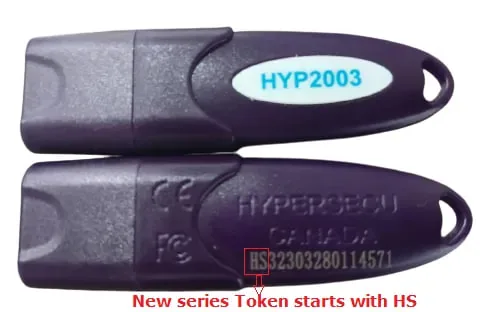
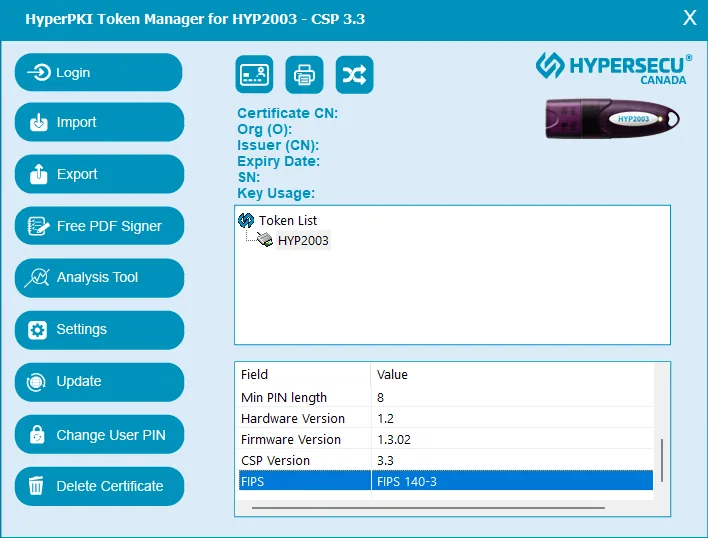
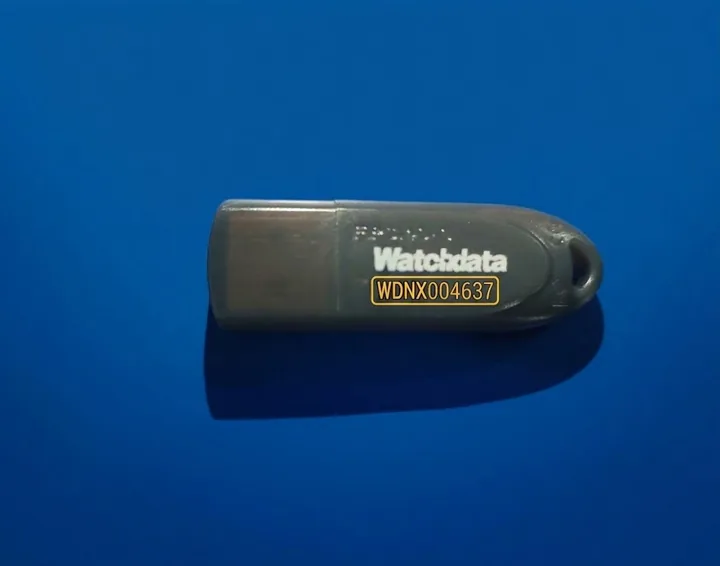
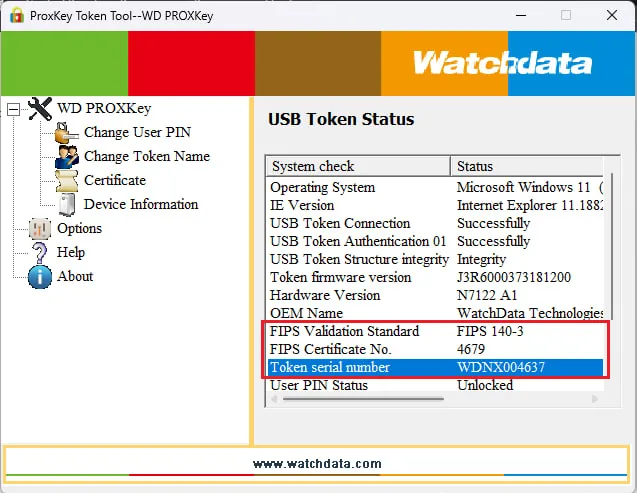
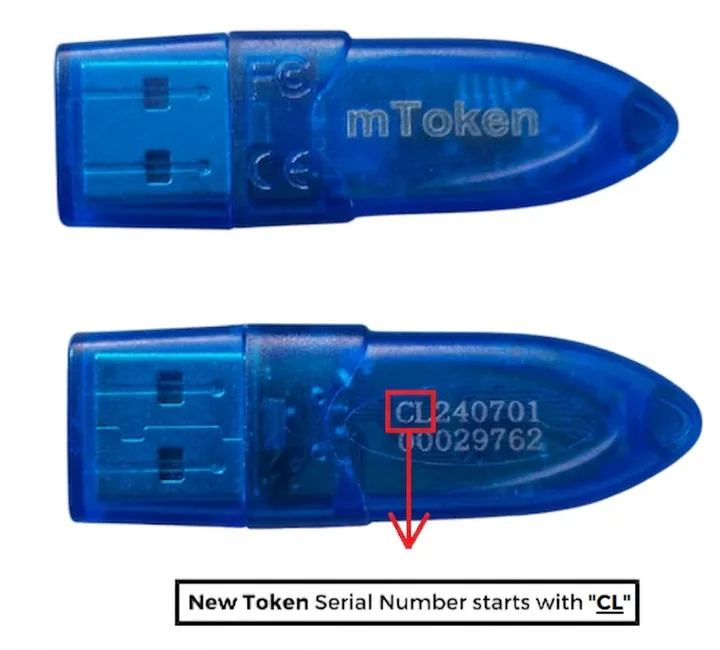
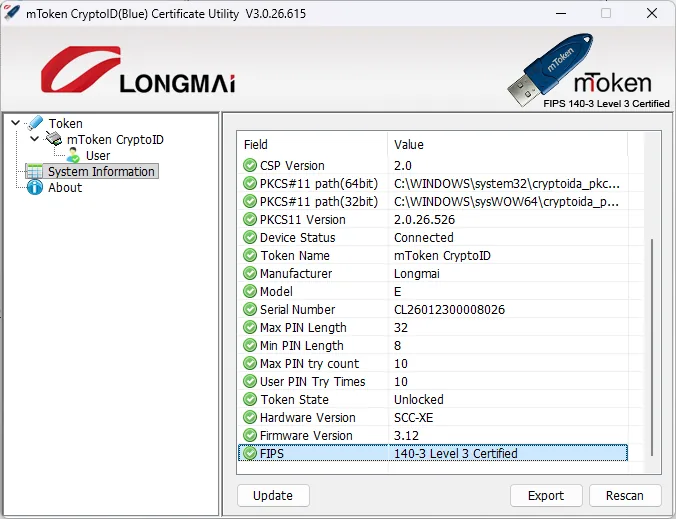
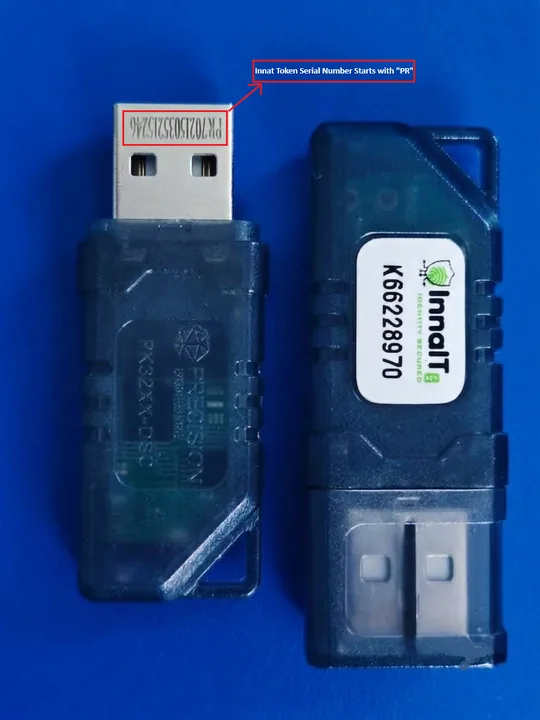
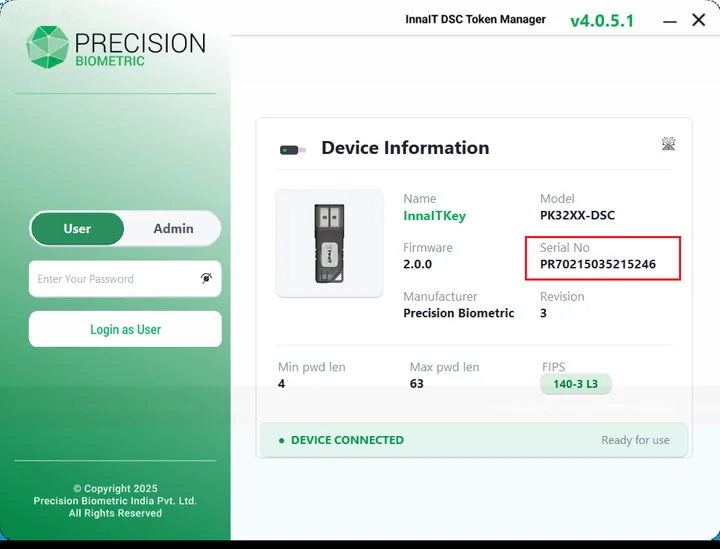
नए HYP2003, WD Proxkey, mToken Blue (CryptoID) और Precision InnaIT FIPS 140-3 टोकन नई CCA India अधिसूचना (FIPS 140-3) के अनुसार हैं। नए प्रमाणपत्र (DSC) डाउनलोड करने के लिए 21/09/2026 से इसी नए CSP का इस्तेमाल करें। यह CSP केवल HS, WDNX, CL और PR सीरीज़ वाले टोकन में प्रमाणपत्र डाउनलोड और इम्पोर्ट होने देता है।The new HYP2003, WD Proxkey, mToken Blue (CryptoID) and Precision InnaIT FIPS 140-3 tokens follow the new CCA India notification (FIPS 140-3). Use this new CSP from 21/09/2026 to download new certificates. It allows certificates to be downloaded and imported only into tokens of the HS, WDNX, CL and PR series.
अभी केवल यही चार USB टोकन DSC डाउनलोड के लिए मान्य हैं। अपने टोकन की सीरीज़ नीचे की तस्वीरों से मिला लें।As of now only these four USB tokens are allowed for DSC download. Match your token series with the pictures below.
HyperPKI HYP2003 HS…
टोकन की बॉडी पर छपा सीरियल नंबर। ड्राइवर इंस्टॉल करने पर ड्राइवर में सीरियल नंबर और FIPS 140-3 दिखता है।Serial number printed on the token body. After installing the driver, the serial number and FIPS 140-3 show in the driver.
WD Proxkey WDNX…
टोकन की बॉडी पर छपा सीरियल नंबर। ड्राइवर इंस्टॉल करने पर ड्राइवर में सीरियल नंबर और FIPS 140-3 दिखता है।Serial number printed on the token body. After installing the driver, the serial number and FIPS 140-3 show in the driver.
mToken Blue (CryptoID) CL…
टोकन की बॉडी पर छपा सीरियल नंबर। ड्राइवर इंस्टॉल करने पर ड्राइवर में सीरियल नंबर और FIPS 140-3 दिखता है।Serial number printed on the token body. After installing the driver, the serial number and FIPS 140-3 show in the driver.
Precision InnaIT PR…
टोकन की बॉडी पर छपा सीरियल नंबर। ड्राइवर इंस्टॉल करने पर ड्राइवर में सीरियल नंबर और FIPS 140-3 दिखता है।Serial number printed on the token body. After installing the driver, the serial number and FIPS 140-3 show in the driver.
DSC अभी खरीदें या रिन्यू करेंBuy or renew your DSC now
DSC खरीदें / रिन्यू करेंBuy / renew DSC
Capricorn का DSC पेज नए टैब में खुलेगा। कुछ पूछना हो तो पहले WhatsApp करें।The Capricorn DSC page opens in a new tab. Message us first if you have questions.
DSC पार्टनर बनेंBecome a DSC partner
Capricorn DSC के पार्टनर बनकर DSC बेचने का काम शुरू करें। जानकारी के लिए हमसे संपर्क करें।Start selling DSCs as a Capricorn DSC partner. Contact us for details.
अक्सर पूछे जाने वाले सवालFrequently asked questions
Waidhan और Singrauli में DSC (डिजिटल सिग्नेचर) कहाँ बनवाएँ?Where can I get a DSC (digital signature) in Waidhan or Singrauli?
वैढ़न (सिंगरौली) में RAMASHANKAR PARVAT से। हम 2014 से DSC के क्षेत्र में हैं और Capricorn के अधिकृत बिज़नेस पार्टनर (2026-27) हैं। WhatsApp: 9752318084।From RAMASHANKAR PARVAT in Waidhan (Singrauli). We have worked in DSC since 2014 and are an authorized Capricorn business partner for 2026-27. WhatsApp: 9752318084.
टेंडर के लिए कौन सी DSC चाहिए?Which DSC is needed for tenders?
ई-टेंडरिंग के लिए आमतौर पर क्लास 3 DSC (साइनिंग और एन्क्रिप्शन) और USB टोकन चाहिए। जानकारी इसी पेज पर दी गई है।E-tendering usually needs a Class 3 DSC (signing and encryption) on a USB token. Details are on this page.
DSC का शुल्क कितना है?What is the DSC fee?
क्लास 3 DSC का शुल्क प्रकार और वैधता के अनुसार लगभग ₹1,900 से ₹3,800 है।Class 3 DSC costs roughly ₹1,900 to ₹3,800 depending on type and validity.
DSC टोकन का ड्राइवर कहाँ से डाउनलोड करें?Where do I download the DSC token driver?
इसी पेज पर टोकन के अनुसार ड्राइवर और सपोर्ट नंबर दिए हैं। नए FIPS 140-3 टोकन की पहचान भी यहाँ बताई गई है।This page lists drivers and support numbers per token. It also explains how to identify the new FIPS 140-3 tokens.
लोग ये भी खोजते हैंPopular searches
- DSC
- DSC वैढ़न
- DSC बैढ़न
- DSC सिंगरौली
- DSC Waidhan
- DSC Baidhan
- DSC Singrauli
- डिजिटल सिग्नेचर
- डिजिटल सिग्नेचर वैढ़न
- डिजिटल सिग्नेचर बैढ़न
- डिजिटल सिग्नेचर सिंगरौली
- डिजिटल सिग्नेचर Waidhan
- डिजिटल सिग्नेचर Baidhan
- डिजिटल सिग्नेचर Singrauli
- Digital Signature Certificate
- Digital Signature Certificate वैढ़न
- Digital Signature Certificate बैढ़न
- Digital Signature Certificate सिंगरौली
- Digital Signature Certificate Waidhan
- Digital Signature Certificate Baidhan
- Digital Signature Certificate Singrauli
- Class 3 DSC
- Class 3 DSC वैढ़न
- Class 3 DSC बैढ़न
- Class 3 DSC सिंगरौली
- Class 3 DSC Waidhan
- Class 3 DSC Baidhan
- Class 3 DSC Singrauli
- क्लास 3 DSC
- क्लास 3 DSC वैढ़न
- क्लास 3 DSC बैढ़न
- क्लास 3 DSC सिंगरौली
- क्लास 3 DSC Waidhan
- क्लास 3 DSC Baidhan
- क्लास 3 DSC Singrauli
- DSC USB token
- DSC USB token वैढ़न
- DSC USB token बैढ़न
- DSC USB token सिंगरौली
- DSC USB token Waidhan
- DSC USB token Baidhan
- DSC USB token Singrauli
- DSC रिन्यू
- DSC renewal
- ई-टेंडर DSC
- संस्था की DSC
- Organization DSC
- DSC बनवाएँ
- RSP बैढ़न
- RSP वैढ़न
- Baidhan Singrauli consultant
- बैढ़न सिंगरौली ठेकेदार कंसल्टेंट
- rsparvat.com
दूसरी सेवाएँ भी देखेंSee our other services
रमाशंकर पर्वत से बात करेंTalk to Ramashankar Parvat
पताAddress
Ward No. 42, Mahapaur Bangla Road, Bilaunji, Waidhan,Distt. Singrauli, (M.P.) 486886
कृपया कॉल के बजाय WhatsApp पर संदेश करें।Please message on WhatsApp instead of calling.